

The Paperback Society, Admin Dashboard
A companion admin dashboard for the TPS founders. Thirteen linked modules covering orders, shipping, listings, users, wallets, disputes, reviews, notifications, a shared inbox, error monitoring, and platform settings. It runs on the same Supabase backend as the mobile app, so every change lands in the reader's pocket in seconds.
The Challenge
Once the TPS app went into closed beta, the founders were running the business out of the raw Supabase console. Orders moved by hand. Disputes lived in WhatsApp. Shipping was tracked in a spreadsheet, and fee changes meant editing the database directly. They needed one interface shaped around the business, not around the tables.
The Solution
A Next.js 14 admin panel, guarded by Supabase SSR, with every operational surface in one sidebar. Operations covers orders, shipping, listings, users. Support covers inbox, disputes, reviews, notifications. System covers financials, errors, settings. Each module reads and writes the same Supabase tables the mobile app uses, so founders and sellers never see different truths.
At a glance
0
Modules
Next.js 14
Framework
Supabase SSR
Auth
In beta
Status
Who it's for
The two TPS founders, a small moderator pool, and, later, finance and logistics partners who only need a slice of the data. One dashboard, role-aware. A moderator lands on disputes. A finance partner lands on payouts.
A sibling to the app, not a rebuild
The dashboard sits on the same Supabase project as the TPS mobile app. Same auth, same tables, same storage. An order marked shipped here updates the buyer's phone in seconds. A listing removed by a moderator vanishes from the feed before the next scroll. For the reader-facing half of the story, see the TPS mobile case study.
Modules
Dashboard and analytics. KPI cards and Recharts visualisations for revenue, user growth, rating distribution, and shipping mix. Wired to live Supabase queries.
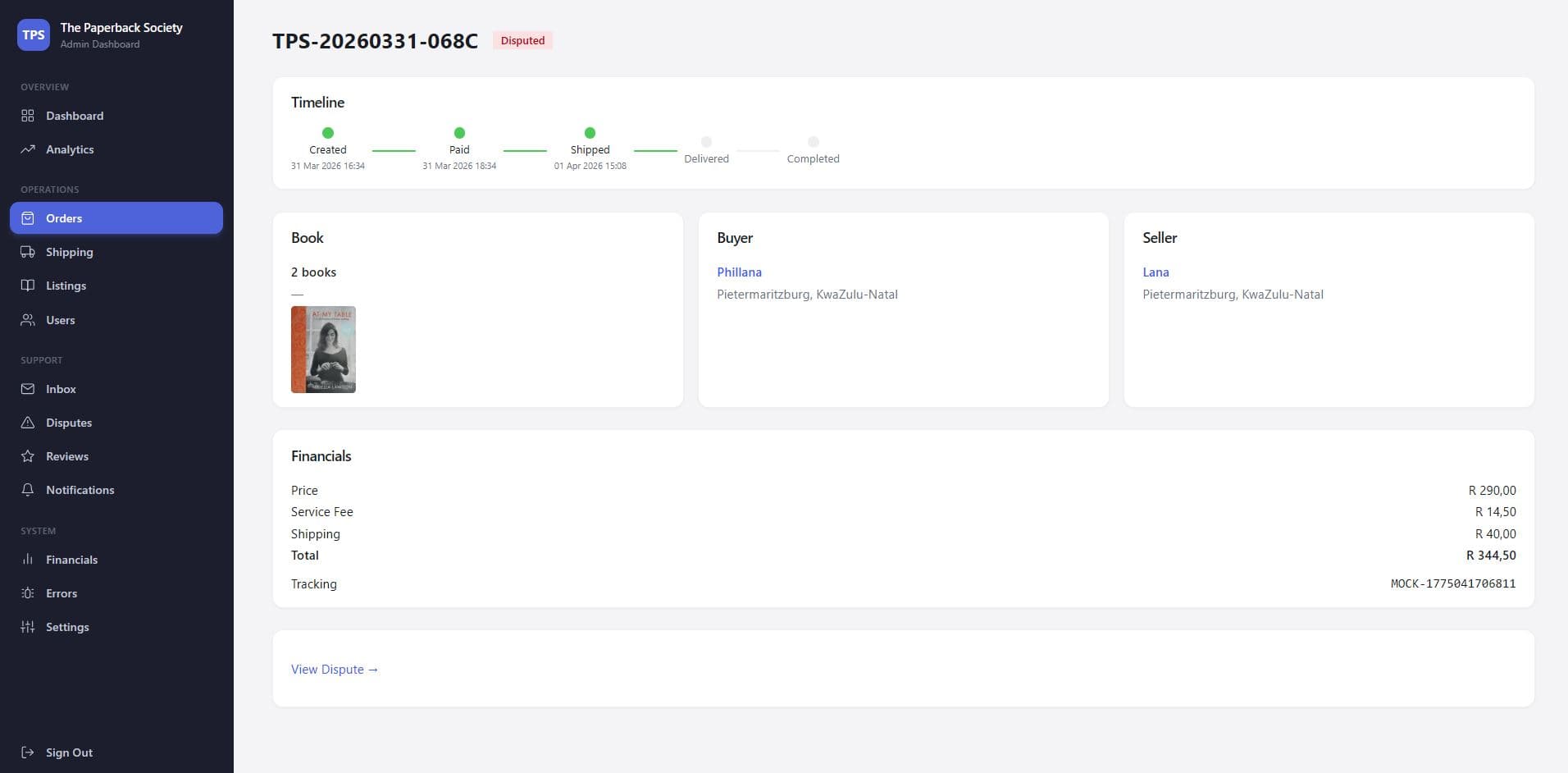
Orders. Every order opens into a five-step timeline. Book, buyer, seller, financials, and tracking stack on one page.
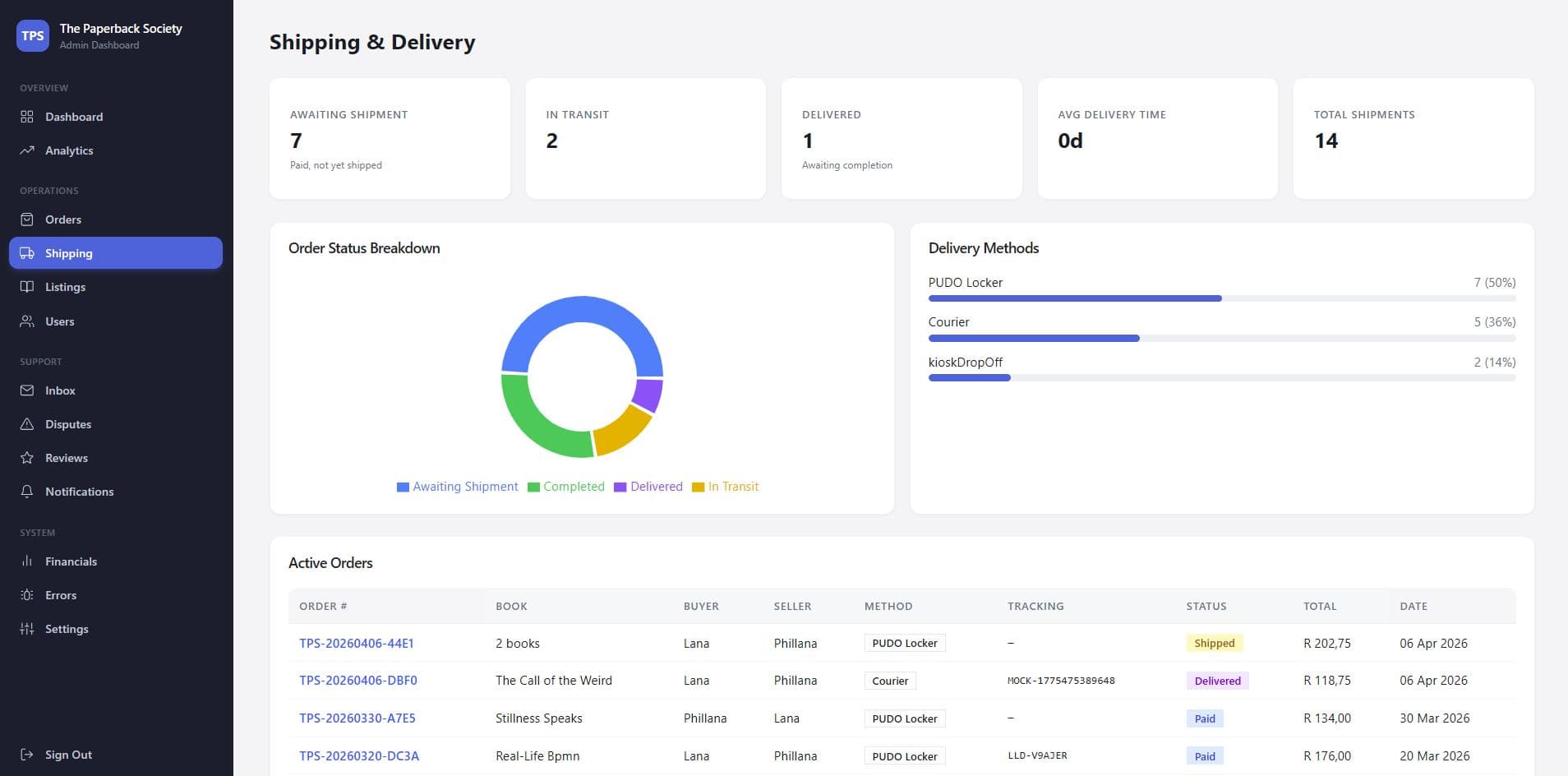
Shipping and delivery. Status KPIs, a donut of order status, a breakdown across PUDO locker, courier, and kiosk dropoff, and an active-orders table.
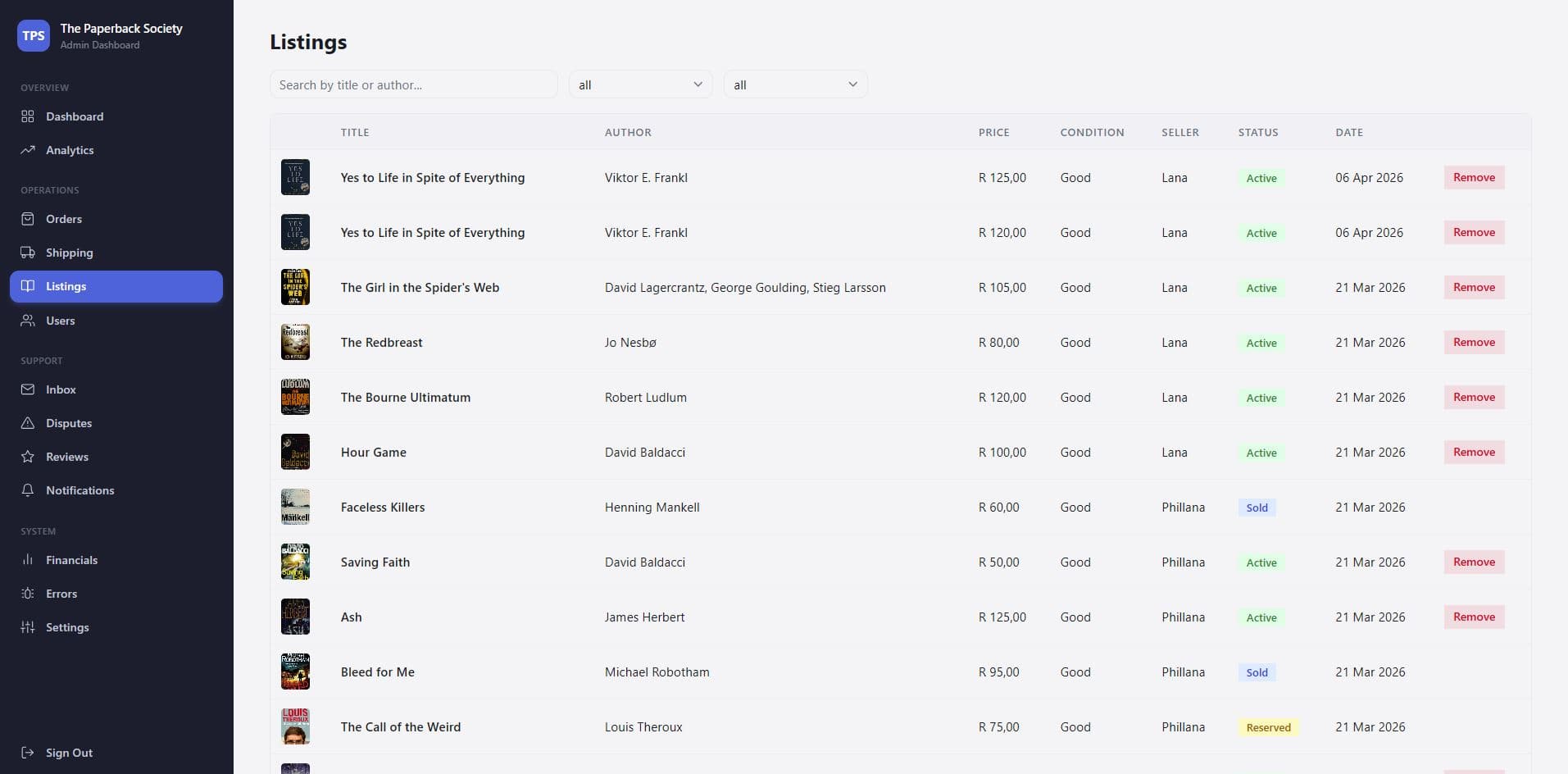
Listings moderation. A searchable, filterable table of every listing with one-tap removal for anything that breaks the rules.
Users. Profiles, roles, wallet balances, and per-user order history. Support questions answered in one screen, not five.
Shared inbox. IMAP sync pulls the TPS support mailbox into the dashboard. Threads, unread counts, and a sync button.
Disputes. Open disputes surface a badge in the sidebar. The panel carries the original buyer-seller thread, receipts, and an action bar for releasing or refunding escrow.
Reviews and notifications. Moderation of user-facing reviews and a console for push campaigns through Firebase Cloud Messaging.
Financials. Fee configuration, wallet totals, transaction health, and withdrawal review. Cash never leaves the platform without a human check.
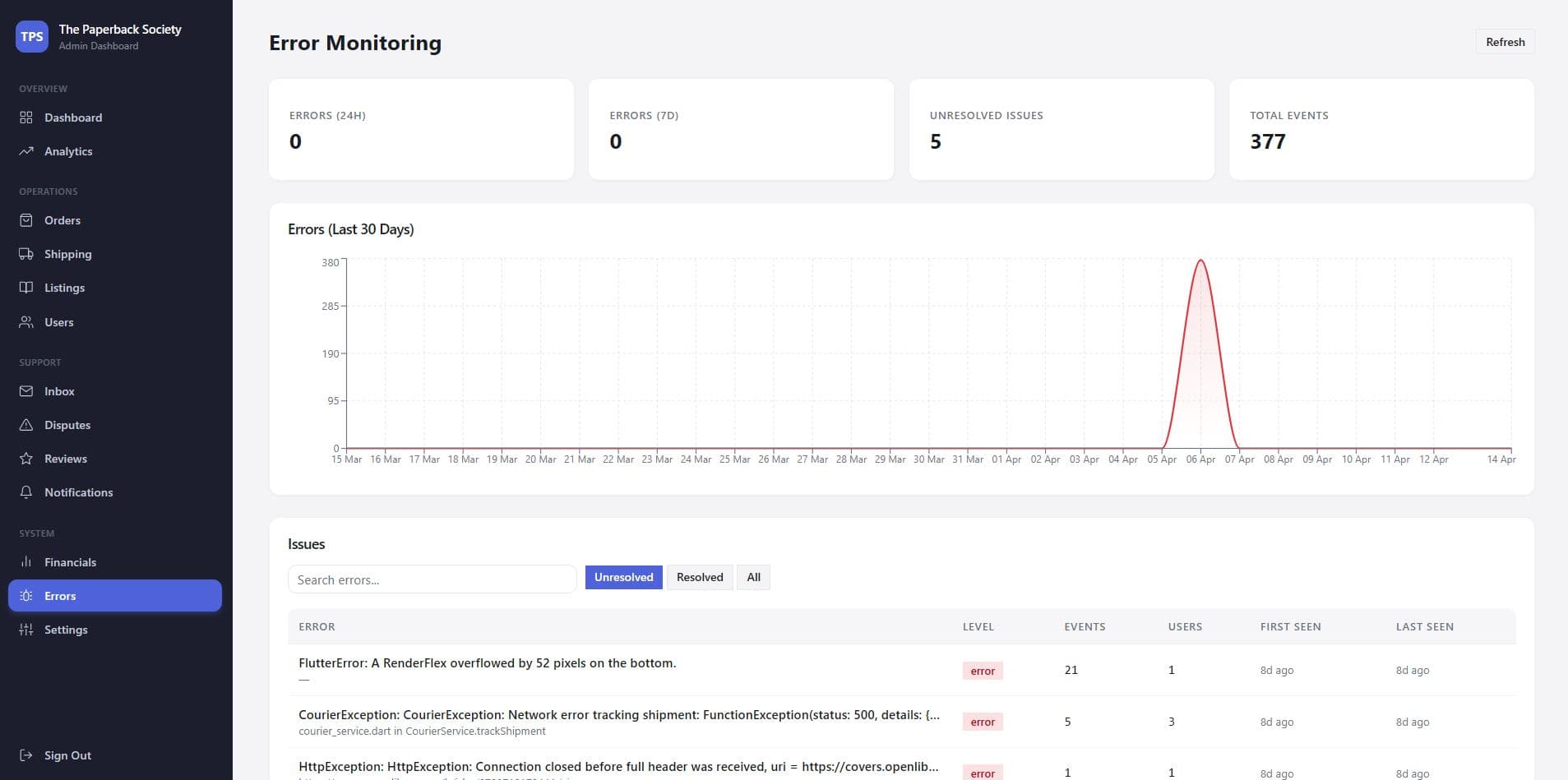
Error monitoring. Sentry events rolled into the dashboard. 24h and 7d counters, a 30-day trend, and an unresolved issues table.
Settings. Live counters, fee configuration, environment indicators, and a view of pg_cron scheduled jobs running in the background.
Behind the Build
A tour of the operator surface, screen by screen.
Order detail, one page
Every order opens with a five-step timeline. Created, paid, shipped, delivered, completed. A moderator sees where a package sits before reading a line of text. Book, buyer, seller, and financials sit side by side. Disputed orders carry a badge and a direct link to the thread.
Shipping, the way the country ships
A KPI strip covers awaiting shipment, in transit, delivered, average delivery time, and total shipments. A donut shows order status. A horizontal bar shows the split across PUDO locker, courier, and kiosk dropoff. The active-orders table sits underneath. No second tab needed.
Listings moderation at scale
A flat table of every listing. Cover thumbnail, title, author, price, condition, seller, status, date. Search by title or author. Filter by status and seller. Remove in one click. No Supabase console, no SQL.
Errors, visible
Sentry events streamed into the dashboard, not buried in a separate tab. Counters for 24 hours and 7 days. A 30-day trend line to catch drift. An unresolved issues table with level, events, affected users, and first and last seen. When a CourierException spikes, the founders see it the same minute a seller does.
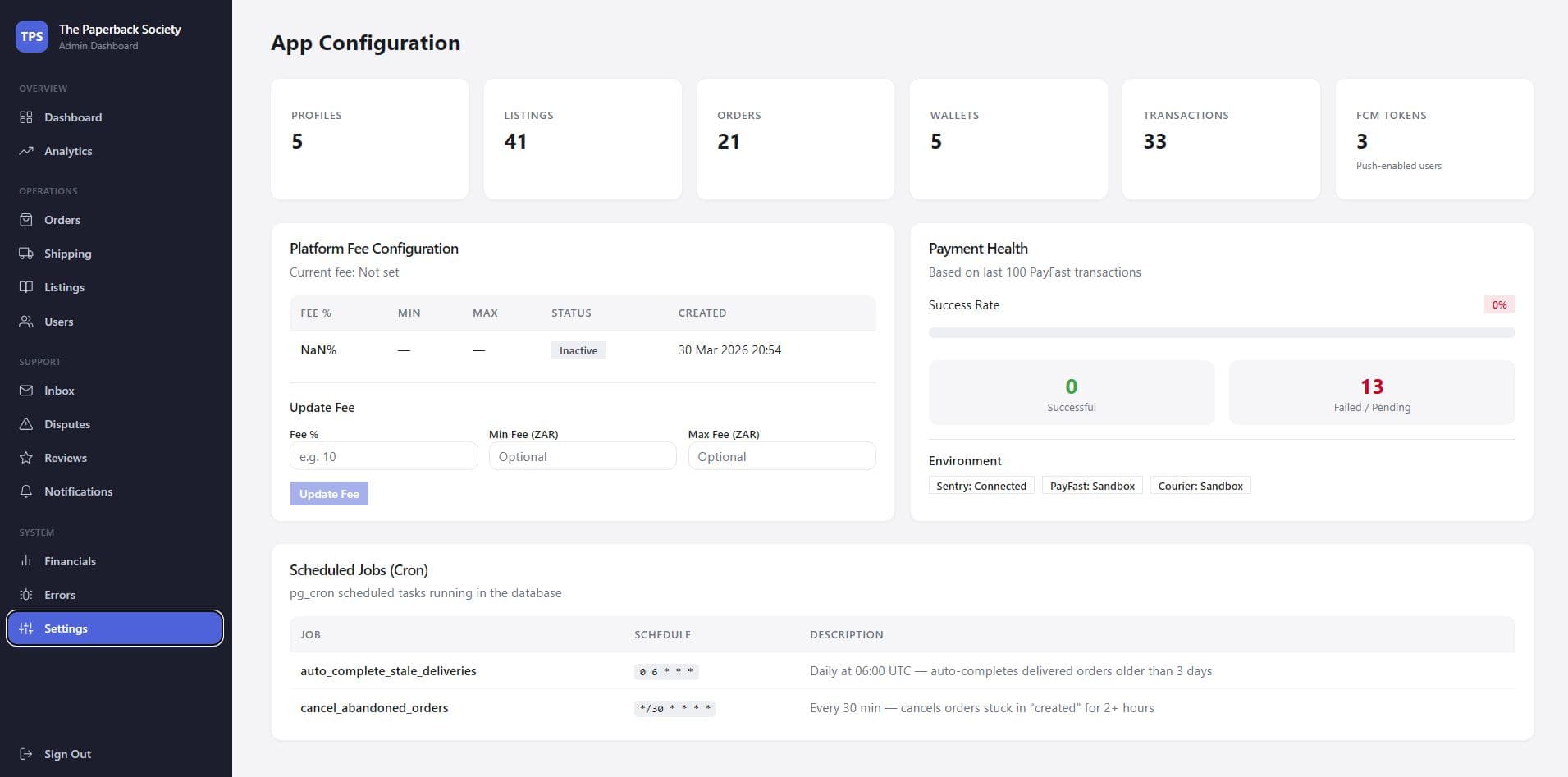
Settings that tell the truth
The settings page is a health check. Live counters across profiles, listings, orders, wallets, transactions, and FCM push tokens. A fee configuration panel with the current platform fee and inline history. A payment health card reading from the last hundred transactions, with environment badges for Sentry and the courier sandbox. Scheduled jobs list every pg_cron task and what it does.
Design direction
A calm, operator-first UI. A narrow dark sidebar with the TPS mark top-left. Nav grouped under Overview, Operations, Support, and System. A red pill on the Disputes row when anything is open. The content area is a light neutral canvas. KPI cards up top, charts and tables underneath. No ornament. The hand-drawn world belongs to the reader-facing app.
Auth and roles
Supabase SSR on every route through Next.js middleware. A sign-in page guards the whole app. Roles live in Postgres row-level security, so a support moderator sees disputes and inbox, but never fees or wallet withdrawals. Same database as the mobile app, tighter policies.
“The dashboard is the difference between running TPS and watching TPS. Every tool we used to need, in one screen.”
Founding Team
The Paperback Society
Technical Stack
A Next.js 14 app, Supabase backend shared with the mobile app, and a tight set of libraries chosen to keep the operator experience fast.
Next.js 14 (App Router)
Framework
TypeScript
Language
Supabase SSR
Auth, middleware
Supabase Postgres
Data (shared with app)
Tailwind CSS
Styling
shadcn/ui
Component layer
Base UI React
Primitives
Recharts
Analytics charts
Sonner
Toasts
Lucide
Iconography
date-fns
Dates
ImapFlow
Support inbox sync
Sentry
Error monitoring
Firebase Messaging
Push campaigns
pg_cron
Scheduled jobs
How We Got Here
Discovery
A working day alongside the founders in the Supabase console. Mapped every manual step they ran to keep the app alive. Orders, shipping, disputes, fee changes, cron jobs.
Design
A sidebar-first layout grouped the way operators think. Overview, Operations, Support, System. KPI cards, tables, and charts as the three building blocks. Stripped of reader-facing illustration on purpose.
Build
Next.js 14 App Router, Supabase SSR through middleware, shadcn/ui on Tailwind, Recharts for analytics. Server actions keep mutations to one round trip. Sentry through every route, IMAP for the inbox, FCM for push.
Launch
Rolled out to the founders first, alongside the mobile closed beta. Moderator accounts added as dispute load grew. Financials and Settings iterated on as the real shape of fees, payouts, and cron jobs became clear in production.